Coding robots can turn screen time into something more active, whether you’re setting up a rainy-day project, a classroom shelf, or a desk-side companion. The right pick depends on age, patience, and how much building or programming you want in the mix. Some kits lean into construction, others focus on drawing, and a few are better for simple app control or early coding practice. This roundup keeps those differences clear so you can match the robot to the job.
Quick Look at the Shortlist
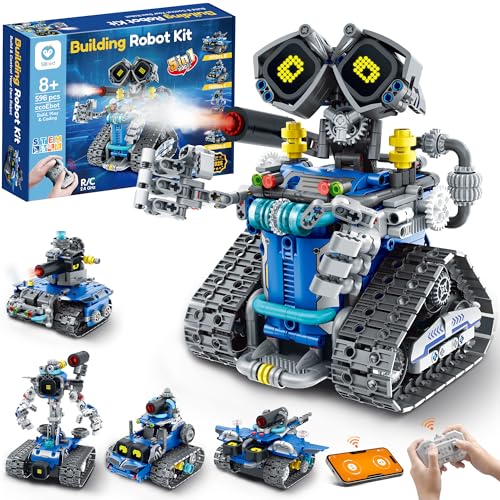
Sillbird STEM Robot Building Kit 596 Pieces

RIVGOT Drawing Robot with 150 Cards

Sphero Mini Activity Kit

Makeblock mBot Ranger 3 in 1 Robotics Kit

Ozobot Evo Coding Robot Kit

LOOI Robot-Space Black AI Desktop Companion

IQKidz APP/Remote Control STEM Kit 440 Pcs

Educational Insights Artie Max Coding & Drawing Robot
More Details On Our Top Picks
Loose parts can become a headache fast, and this kit leans into the kind of build that keeps a child busy without feeling too technical. The 5-in-1 format gives you a few rebuild paths, so it suits a home where the robot needs to stay interesting after the first afternoon.
The 596-piece count also points to a longer build session, which is good for patient kids and a little less friendly for anyone who wants a quick snap-together project. Compared with the more drawing-focused RIVGOT and the app-first Sphero Mini, this one is the most hands-on construction pick in the group.
Strong Points
- Five build modes give the set more replay value.
- Remote control adds a play layer after assembly.
- LED eyes help the finished robot feel lively.
- 596 pieces create a substantial build experience.
Points To Note
- The piece count can feel busy for younger builders.
- More parts also means more cleanup after play.
Feature Card
Whose Shelf It Belongs On
Kids ages 8 and up who like building more than watching.
Where A Sibling Pick Shines
RIVGOT Drawing Robot for Kids with 150 Cards suits younger children who want a gentler, more guided creative activity.
For younger kids, a drawing robot can land better than a more build-heavy kit, and this one keeps the experience simple. The built-in music and card-based prompts give children a clear path from start to finish, which helps during quiet play at home or in a classroom corner.
That guided format makes it easier to stay focused, though it also leaves less room for open-ended engineering play than the Sillbird or Makeblock kits. In most homes, that trade-off works nicely for early learners who want a little structure without too much setup.
What We Like
- 150 cards create lots of repeat drawing prompts.
- Music adds a playful layer to the activity.
- Step-by-step use supports independent play.
- Built for early creative and motor-skill practice.
Areas To Watch
- It leans more toward art than coding.
- Card storage can matter in shared play spaces.
Details At A Glance
Built With In Mind
Children around ages 3 to 8 who like guided drawing and simple creative routines.
Skip It When
You want hands-on robotics construction, since the Educational Insights or Makeblock options lean much harder into that side of the category.
This kit sits at the cleaner, more app-driven end of the group, which makes it a strong fit for a desk, shelf, or school table. The activity format should feel less overwhelming than a larger build set, and that can help a child stay focused on coding concepts instead of wrestling with parts.
Compared with the Sillbird and IQKidz kits, Sphero Mini keeps the footprint smaller and the whole idea more streamlined. You may find that simplicity useful for first-time coders who want movement and app control without a big assembly session.
Highlights
- Small footprint suits tight spaces.
- App-enabled play keeps coding hands-on.
- Activity kit format supports guided learning.
Softer Spots
- Smaller kits can feel less tactile than large builds.
- App-based play depends on a phone or tablet.
Spec Overview
Right Fit For
Kids and beginners who want a compact coding robot with a lighter setup.
A Better Fit Elsewhere
Makeblock mBot Ranger 3 in 1 Robotics Kit suits older kids who want more building and more complex project work.
This is the kit that starts to feel closer to a serious STEM project than a simple toy. The three build forms, Land Raider, Nervous Bird, and Dashing Raptor, give you different play styles, so the set has more range than the one-build options above it.
The Scratch and Arduino angle also puts it in a more advanced lane, which helps older kids who want real project depth. Compared with the Sphero Mini, the learning curve is steeper, but that’s the point for families who want a longer runway.
Best Bits
- Three build forms broaden the kit’s use.
- Scratch and Arduino support deeper learning.
- Project-based setup suits patient builders.
- App control adds another layer of interaction.
Room For Improvement
- The advanced path can feel much busier for newcomers.
- Build time and part management take more patience.
Technical Sheet
Who Should Grab It
Kids around 8 to 12 who already enjoy building kits and want more programming depth.
Look Elsewhere When
RIVGOT Drawing Robot for Kids with 150 Cards makes more sense for younger children who need a simpler first activity.
Ozobot Evo sits in a useful middle ground for homes and classrooms that want coding without a giant setup. The age range starts younger than several kits here, so it can work well for early elementary learners who still need some structure and repeated practice.
That classroom-friendly feel also makes it easier to share across small groups, especially compared with the more personal build experience of Sillbird or Makeblock. The honest read is that the exact package detail matters here, since the Evo listing points to different kit versions.
Bright Spots
- Works well in both home and classroom settings.
- Younger age range opens the door earlier.
- Clear coding focus keeps the learning goal simple.
Small Caveats
- Kit format can vary by package listing.
- Shared-use settings need a bit of organization.
Core Details
Made For
Young kids and teachers who want a coding robot that fits organized learning time.
Where Shoppers Go Wrong
Makeblock mBot Ranger 3 in 1 Robotics Kit suits families who want a more advanced build experience and more technical room to grow.
LOOI feels less like a classroom robot and more like a desk companion with a personality layer. The voice interaction, visual understanding, memory features, and 10W wireless charging give it a very different role from the build-and-code kits above.
That also means it makes the most sense for a tech-heavy desk, not a child who wants a traditional coding lesson. One thing worth considering is the English-only support note, which can matter in multilingual homes.
Reasons To Buy
- Voice interaction creates a more conversational feel.
- Memory features help it feel less one-note over time.
- Wireless charging adds desk convenience.
- Tools like reminders and weather fit everyday use.
Honest Caveats
- It is not a classic coding lesson robot.
- English-only support narrows the fit for some homes.
- Wireless charging needs the right adapter setup.
Feature Rundown
The Right Fit
Tech enthusiasts who want a voice-driven desk companion with a playful edge.
Another Choice May Suit
Educational Insights Artie Max the Coding & Drawing Robot suits families that want a more direct coding-and-art activity for kids.
IQKidz brings together app control, remote control, and a three-in-one build path, which makes it feel versatile without tipping into the most complex tier. The green race car, robot figure, and stunt tank style give kids different ways to rebuild and keep the set in rotation.
Compared with the Makeblock kit, this one looks a little more approachable for families that want STEM value without jumping straight into deeper coding platforms. The trade-off is that it may feel less advanced, but for many 8 to 12 year olds that’s the sweet spot.
Plus Points
- Three rebuild modes add variety.
- App and remote control widen the play options.
- 440 pieces create a substantial build.
- Works well for STEM-style family projects.
Minor Gripes
- Assembly can still take a fair amount of time.
- It sits below the more advanced coding kits.
At A Glance
Perfect Match For
Kids ages 8 to 12 who want a buildable robot car with a fair amount of play variety.
Where A Sibling Pick Shines
Sphero Mini Activity Kit is the simpler choice for shoppers who want a smaller, more streamlined coding path.
Artie Max sits in a nice middle space between coding practice and creative output, because the code turns into drawings on paper. That makes it especially appealing for kids who like seeing a visual result, not just moving a robot around the floor.
The built-in tutorials and five coding languages also make it more flexible than most of the kid-focused kits here. Compared with the RIVGOT drawing robot, this one pushes harder into actual coding concepts, which helps older children who are ready for more structure.
Standout Traits
- Code-to-drawing play keeps learning visual.
- Five languages create a longer learning runway.
- Built-in tutorials help beginners get started.
- Works for both novice and more advanced coders.
Worth Noting
- Paper-based drawing means ongoing supply use.
- Kids who want physical robot building may want more assembly.
Core Details
Who It Suits Best
Kids ages 8 to 12 who like art, coding, and guided learning in the same kit.
Reach For A Different Pick
RIVGOT Drawing Robot for Kids with 150 Cards suits younger children who want a lighter, more guided art activity.
How To Choose The Right Coding Robots
Match the robot to the child’s patience level
Some coding robots are really build kits in disguise, and that’s fine as long as the child likes assembling parts first. Sillbird and Makeblock ask for more focus, while Sphero Mini and Ozobot Evo get to the action faster. The calmer the attention span, the more useful a guided or app-led setup becomes.
Older kids often enjoy the step-up in challenge, especially with Scratch or Arduino support. Younger children usually do better with robots that use cards, simple prompts, or built-in tutorials. That’s the difference between a toy that gets used once and one that keeps moving around the house.
Decide whether you want building, coding, or art
Not every robot in this category does the same job, and that’s the part many shoppers miss. Some, like Artie Max, turn code into drawings, while others, like IQKidz, focus on movement and rebuilds. A drawing robot belongs in a creative corner, not beside a heavy-duty STEM bench.
Build-focused kits teach structure and mechanical thinking, which matters for kids who like taking things apart and putting them back together. Coding-first kits feel better for children who want to see commands turn into motion. Pick the path that fits the child’s favorite kind of play, not just the flashiest package.
Look closely at control style and age range
App control, remote control, and voice interaction all change the feel of ownership. App-based robots suit kids who already handle a tablet well, while remote-controlled options can be easier for beginners who want instant movement. Voice-driven desktop companions like LOOI belong in a very different lane, more desk gadget than coding lesson.
Age guidance matters because it usually reflects how much setup and reading the kit expects. A younger child can get frustrated by a set that needs too many steps, while an older child may outgrow a simple prompt system quickly. Matching age range to skill level makes the whole thing feel smoother.
Things Worth Knowing First
Common Shopping Slip Ups
It’s easy to grab a kit that looks exciting and miss the learning style underneath it. A child who wants to build may not enjoy a robot that mostly draws, and a child who likes guided play may not want a complex three-form kit.
Another common miss is overlooking setup time, especially with sets that have hundreds of pieces. Storage matters too, because loose parts spread fast across kitchen tables and playroom floors.
What The Higher Tier Buys
More expensive coding robots usually bring richer software paths, deeper programming options, or sturdier multi-part builds. That’s why Makeblock and Artie Max feel more capable than simple starter toys, they give you more room to grow.
The upgrade makes sense for families who know the robot will get repeated use, not just a one-week trial. For casual play or younger children, a simpler kit often makes more sense and keeps frustration down.
Frequently Asked Questions
What age works best for coding robots?
Ages 5 to 12 cover most of the picks here, but the right fit depends on the child’s patience and reading level. Younger kids usually do better with guided drawing or simple app control.
Do coding robots need a tablet or phone?
Several app-enabled robots do, while others rely on cards, remote controls, or built-in tutorials. It helps to check the control style before you choose.
Are these mostly toys or learning tools?
They can be both, but the balance shifts by model. Makeblock and Artie Max lean harder into learning, while LOOI is more of a desk companion.
Which pick is easiest for a first project?
Sphero Mini Activity Kit and Ozobot Evo are strong starting points because they keep the format simpler. RIVGOT also works well for very young children who want a gentler first step.
Which option gives the most building time?
Sillbird, Makeblock, and IQKidz all give you more assembly than the smaller app-driven kits. Those are better when the build is part of the fun, not just the setup.
Closing Thoughts
The right coding robot depends on how your child likes to learn, not just how impressive the box looks. If you want building, Sillbird, Makeblock, and IQKidz give you the most hands-on time. If you want guided creativity, RIVGOT and Artie Max make more sense, while Sphero Mini and Ozobot Evo stay simpler for first-time coding. Pick the style that fits your home, and the robot is much more likely to stay in rotation.