Seven-year-olds usually want a robot that feels fun first and educational second. That balance matters, because a toy that looks too technical can sit untouched, while one that only dances can run out of steam fast. The picks below lean on remote control, gesture response, buildable parts, and coding-style play, so you can match the toy to your child’s patience, interest, and table space.
Quick Look At The Shortlist
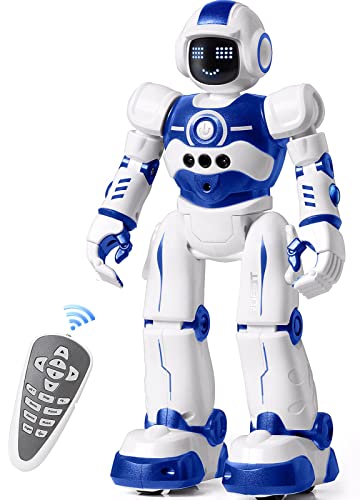
EduCuties Robot Toy for Kids, Programmable Remote Control Smart Walking Dancing Robot
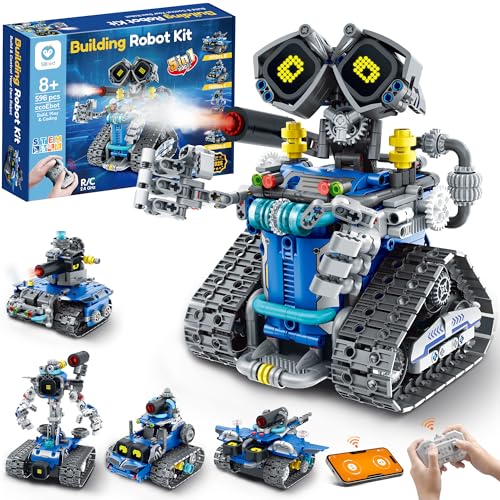
Sillbird STEM Robot Building Kit with Remote Control, 5in1 Models, 596 Pieces
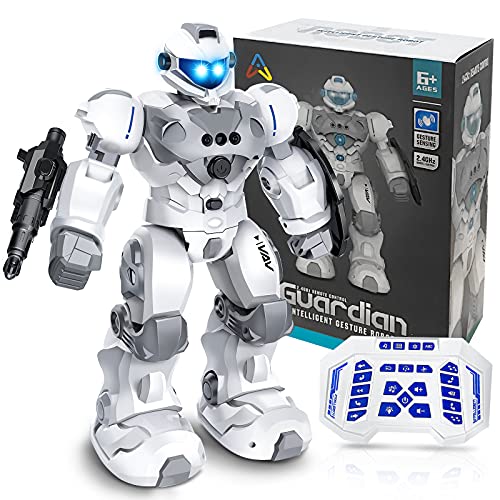
VAV Rechargeable Remote Control Robot Toy with Gesture Sensing

Makeblock mBot Ranger 3 in 1 Robotics Kit for Kids Age 8-12

Aikmi RC Robot with Projector Night Light, Gesture Control, and Music
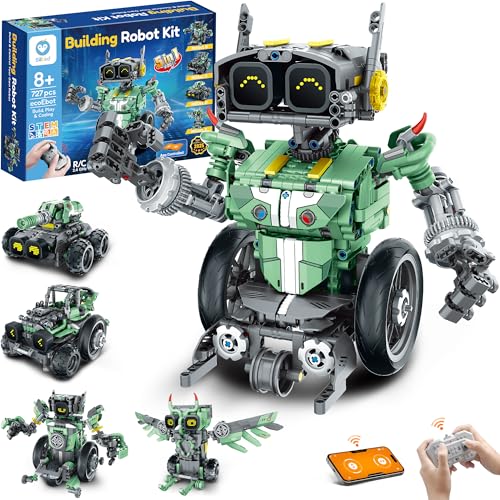
Sillbird Robot Car Building Kit with Remote Control, 5in1 Models, 727 Pieces

Tsomtto STEM Robotics Kit Set Science Experiments Project Activities
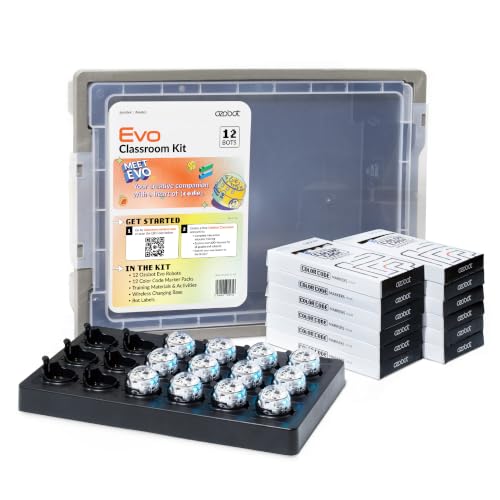
Ozobot Evo 12 Bot Classroom Kit, Ages 5-11
More Details On Our Top Picks
This one suits the seven-year-old who wants something interactive without a long setup. Remote control, gesture sensing, walking, and dancing keep the play loop simple, which helps in a living room or playroom where attention spans shift fast. The honest read is that it feels more like a playful robot buddy than a coding lesson, and that’s fine for many families.
Compared with the build-heavy Sillbird kits, EduCuties asks far less from the grown-up side of the table. That makes it a softer entry point for birthdays, casual afternoons, or a child who likes immediate action over assembly.
Strong Points
- Remote and gesture control give you two easy ways to steer play.
- Walking and dancing motions keep the toy lively without extra parts.
- Low setup keeps frustration down for younger hands.
- Works well for short indoor play sessions in a small room.
Things To Consider
- It leans more toward interactive play than true coding practice.
- Small moving toys usually need regular battery attention and a safe storage spot.
Feature Snapshot
Who It Suits Best
You have a younger child who likes action first and schoolwork later.
Where A Sibling Pick Shines
Sillbird STEM Robot Building Kit with Remote Control fits a child who wants to assemble parts and spend more time building than moving a finished toy.
After the ready-to-play EduCuties robot, this Sillbird kit moves into hands-on building territory. The 596 pieces and 5in1 layout give you real variety, so a child can spend time assembling, rebuilding, and then moving into remote-controlled play. That mix tends to suit kids who like projects with a clear payoff at the end.
The LED eyes add personality without turning the kit into a one-note display piece, and the parts count gives older seven-year-olds a longer runway. You may find the assembly time a little demanding for a first robotics toy, though that’s part of the appeal for families who want more than a quick gadget.
Positives
- Five build options stretch the play value beyond a single model.
- 596 pieces create a satisfying hands-on build for patient kids.
- Remote control adds movement after the build is done.
- LED eyes give the finished robot a lively look on a shelf or desk.
- Good fit for afternoon projects that blend building and play.
Softer Spots
- The larger piece count can feel heavy for a child who wants instant play.
- More parts also mean more cleanup and storage after each session.
- It sits closer to a STEM kit than a simple toy robot.
Core Details
Made For
You have a seven-year-old who likes building as much as playing.
A Better Fit Elsewhere
EduCuties Robot Toy for Kids, Programmable Remote Control Smart Walking Dancing Robot suits a younger child who wants a quicker start and less assembly.
VAV sits between a toy robot and a more expressive electronic companion. Gesture sensing and remote control both feed into the same simple play pattern, and the larger body with LED eyes gives it a more dramatic look than EduCuties. In a family room or bedroom, that visual presence matters more than you might expect.
The built-in battery and USB charging make this pick easier to keep in rotation, especially for travel between rooms or visits to grandparents. The trade-off is that the design leans hard into spectacle, so a child who mainly wants assembly and coding practice may outgrow it sooner.
Highlights
- Gesture sensing adds a clear wow factor without complicating the controls.
- Rechargeable power keeps you from sorting through spare batteries as often.
- LED eyes and the larger shell give it strong shelf appeal.
- USB charging works neatly with laptops, car chargers, or adapters.
Areas To Watch
- The showy design puts less focus on hands-on building.
- One charging cycle is still another thing to remember in busy households.
Technical Sheet
Best Suited To
You want a lively robot for a child who enjoys motion and flashy detail.
Swap It Out When
Makeblock mBot Ranger 3 in 1 Robotics Kit makes more sense for a child who wants deeper build-and-code work.
The mBot Ranger is the most classroom-like pick in this set, and that matters for a child who already likes tinkering. Its three robot shapes, app control, and Scratch-compatible learning path point toward real STEM growth, not just a toy that moves around. Scratch is a block-based coding system, so it feels more visual and less intimidating than typing code from scratch.
Compared with VAV and EduCuties, this one asks for more patience but gives back more learning depth. For an older seven-year-old or an advanced eight-year-old, that trade feels fair, though the setup may be too much for a casual afternoon.
Reasons To Buy
- Three build forms add real variety to the same kit.
- App control keeps the robot part of the play after assembly.
- Scratch-friendly learning introduces coding in a visual way.
- Good fit for kids who like solving problems step by step.
- Feels more like a STEM project than a simple novelty toy.
Points To Note
- The learning curve is steeper than the simpler remote-control picks here.
- It makes more sense for focused build time than quick grab-and-go play.
Quick Facts
Whose Shelf It Belongs On
You have a child who is ready for a deeper STEM challenge and likes structured projects.
Another Choice May Suit
Sillbird STEM Robot Building Kit with Remote Control is easier to approach for families who want more pieces and a softer entry into building.
Aikmi leans into mood as much as movement, which gives it a different role from the louder VAV robot. The projector night light, gesture control, and music features make it useful for playtime that spills into a bedroom routine. The star projector effect is a nice touch, though it feels more like a special feature than the main reason to choose it.
That balance works well for families who want a toy with a softer evening personality. You may find the music and light show more memorable than the robot motion itself, and that’s the point here.
Bright Spots
- Projector lights add a distinct nighttime play option.
- Gesture sensing and remote control give you flexible interaction.
- Music and dance tunes bring more energy to play sessions.
- The recharge-friendly design suits repeat use across the week.
Small Caveats
- The projector feature may matter more to some households than others.
- Music-driven toys can feel busy in quiet spaces.
Details At A Glance
The Right Fit
You want a robot toy that can live in both the playroom and the bedroom.
Where A Sibling Pick Shines
Ozobot Evo 12 Bot Classroom Kit is better for group coding sessions and structured learning time.
Compared with the 596-piece Sillbird kit, this version asks for even more patience and gives back a larger build experience. The 727-piece count makes it better suited to a child who likes projects that unfold in stages, especially with a parent nearby. It feels less toy-like and more like a weekend build that ends with remote-controlled play.
That extra size can be rewarding, though it also means more time spent sorting and assembling. For a seven-year-old who enjoys longer projects, it can be a very satisfying line between craft time and robot time.
What We Like
- Five build forms keep the set from feeling one-and-done.
- 727 pieces support a longer, more absorbing build.
- Remote control keeps the finished model playable after assembly.
- Strong fit for kids who like a bigger project table.
Room For Improvement
- The larger parts count can feel slow for impatient kids.
- Storage matters here because small pieces are easy to misplace.
Spec Overview
Built With In Mind
You have a patient child who likes long build sessions and then wants something to move.
Look Elsewhere When
EduCuties Robot Toy for Kids, Programmable Remote Control Smart Walking Dancing Robot is the easier choice for quick play with less assembly.
Tsomtto stands out because it offers several different build-and-learn activities instead of one single robot. The set includes a reptile robot, balance car, bubble machine, fiber lamp, and sliding plane, so a seven-year-old gets variety without needing a whole new box each time. That spread is useful for family craft time, especially when attention moves from one idea to the next.
The variety also means the kit feels less tied to one kind of play outcome. For a child who likes trying different builds and seeing how mechanisms behave, it has a nice mix of motion, light, and curiosity.
Best Bits
- Six separate kits create more than one kind of building session.
- Different projects keep the toy from feeling repetitive.
- Good fit for kids who like science-themed variety.
- Lets families move between quick builds and longer sessions.
Worth Noting
- The set is broader than a single-purpose robot, so expectations should stay flexible.
- Several builds mean more parts to sort after play.
Feature Rundown
Who Will Love This
You want a mixed activity set for a child who gets bored by one-note toys.
Reach For A Different Pick When
Makeblock mBot Ranger 3 in 1 Robotics Kit is the better match for a child who wants deeper coding structure.
Ozobot Evo is built for groups, which gives it a very different role from the toy-first picks above. A 12-bot classroom kit fits school clubs, homeschool pods, and after-school groups where multiple kids need something structured at once. That makes it less about a single child’s solo play and more about coordinated learning time.
For a seven-year-old, it can feel best when an adult is guiding the activity or when the robot is part of a shared lesson. The trade-off is obvious, since this kind of kit makes far more sense for teams than for a child looking for a personal bedroom toy.
Positives
- Classroom kit format works well for group learning.
- Multiple bots make shared activities easier to organize.
- Fits school, club, or homeschool settings naturally.
- Strong choice for structured coding time with several children.
Honest Caveats
- It makes less sense as a solo toy for casual home play.
- The group-first format can be more than a single family needs.
Core Details
Perfect Match For
You need a classroom-style option for a club, pod, or homeschool group.
Skip It When
EduCuties Robot Toy for Kids, Programmable Remote Control Smart Walking Dancing Robot is the easier fit for a single child’s everyday play.
How To Choose The Right Coding Robots For 7 Year Olds
Start With The Child’s Play Style
Seven-year-olds usually fall into two broad camps, the ones who want action right away and the ones who enjoy building toward the fun. Remote-control picks like EduCuties and VAV suit the first group, because the robot starts moving fast and the instructions stay simple. Build-heavy kits like Sillbird, Makeblock, and Tsomtto suit the second group, because the process becomes part of the reward.
The sweet spot is a toy that matches attention span, not just age on the box. A child who loves tinkering may stay engaged with a 596-piece kit far longer than with a dancing robot, while another child will be happiest with a toy that responds to gestures in seconds.
Match The Learning Curve To The Home Routine
A coding robot only works well when the setup fits your routine. Busy evenings call for something that charges easily, stores cleanly, and doesn’t need a long assembly session before play begins. Family projects on weekends can handle a larger kit, especially one with multiple build modes or a classroom-style learning structure.
You also want to think about how much help a child will need. Scratch-based kits and multi-part builds are better for shared adult-child sessions, while gesture and remote toys are easier for solo play after school.
Look Closely At Control And Feedback
Control style changes everything. Gesture sensing feels intuitive for younger kids, remote control gives more direct steering, and app or Scratch support opens the door to coding concepts. A robot with lights, sounds, or clear movement feedback can hold attention longer, but too many effects can distract from the learning side.
That’s why the best match often depends on the balance between play and instruction. If you want a toy that feels like a toy first, choose a simpler mover. If you want the robot to teach problem-solving, look for a kit that asks the child to assemble, adjust, and rebuild.
Think About Storage, Pieces, And Shared Use
Parts count matters more than many families expect. A 727-piece kit can be exciting, but it also asks for a bin, a steady table, and a little patience during cleanup. Smaller classroom kits and finished robots are easier to hand around, share, and pack away.
Shared use changes the equation too. A single-child room toy and a group learning kit serve different purposes, so the better choice depends on whether you need one child entertained or several children occupied together.
Things Worth Knowing First
Common Shopping Slip Ups
A common mistake is choosing a robot that looks advanced but does very little beyond moving around. That can disappoint a child who wants real building or coding work. Another easy miss is buying a large kit for a child who wants instant play, then discovering the assembly step becomes the bottleneck.
The safer move is to line up the toy with the way the child actually plays at home. Short play bursts call for simpler robots, while longer attention spans can handle multi-stage builds and coding tasks.
What The Higher Tier Buys
Higher-tier kits usually spend the extra money on more parts, more build options, and a deeper learning path. That shows up in 3-in-1 or 5-in-1 designs, larger piece counts, and code-friendly systems such as Scratch-style control. You’re paying for more ways to reuse the same box, not just a fancier shell.
That upgrade makes sense for a child who already likes puzzles, model kits, or screen-guided learning. For a casual toy rotation, the simpler robot often feels easier to live with.
Frequently Asked Questions
Are coding robots a good fit for seven-year-olds?
Yes, as long as the robot matches attention span and fine-motor skill. Simple remote-control robots suit casual play, while buildable kits suit kids who enjoy step-by-step projects.
Do seven-year-olds need app control to enjoy a coding robot?
No, and many do better with gesture or remote control first. App control matters more when you want a stronger bridge into coding concepts.
How many pieces are too many for this age?
That depends on patience and adult help, not just age. A larger set can be a great fit for a child who likes projects, while another child may prefer a smaller robot that starts moving sooner.
What makes a classroom kit different from a regular robot toy?
A classroom kit is built for shared learning and repeated use across several children. A regular robot toy usually focuses more on individual play and simple movement.
Should you choose lights, sounds, or build options first?
Choose the feature that matches the child’s main interest. Lights and sounds add excitement, while build options and coding paths matter more for learning value.
Closing Thoughts
A good coding robot for a seven-year-old should feel inviting on day one and useful a few months later. That’s why the list splits into quick-play robots, buildable STEM kits, and classroom-style learning tools. The right choice depends on whether you want movement, assembly, coding practice, or some mix of the three. Pick the robot that fits your child’s patience and play style, and the learning usually follows naturally.