Coding robots can turn screen time into hands-on problem solving, which matters when you want something more useful than another app to stare at. The right pick depends on age, patience, and how much building you want involved, because some kits are closer to a construction project and others feel ready from the start.
That split is the whole story here. You’ll see options for younger kids who need simple cause and effect, plus more advanced kits for families who want app control, block coding, drawing, or multi-model builds.
Quick Look at the Shortlist
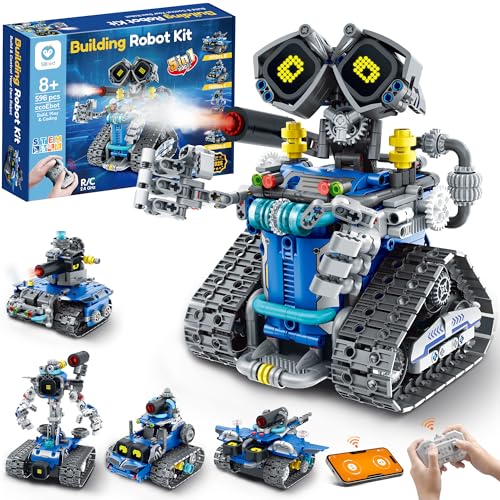
Sillbird STEM Robot Building Kit with Remote Control


Makeblock mBot Ranger 3 in 1 Robotics for Kids Age 8-12


Learning Resources Coding Critters Go Pets Scrambles the Fox Coding Robot

Educational Insights Artie Max the Coding & Drawing Robot
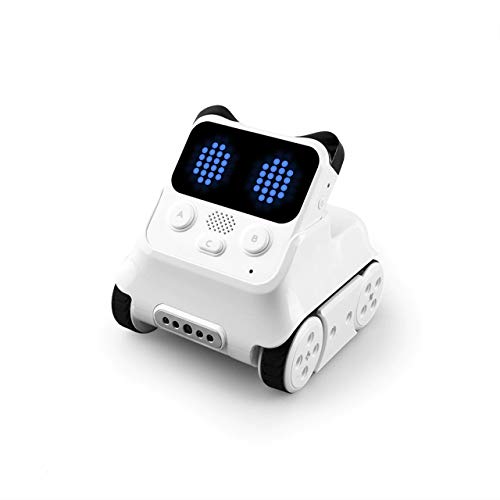
Makeblock Codey Rocky Interactive Emo Robot

Learning Resources Botley 2.0 The Coding Robot
More Details On Our Top Picks
Pattern-heavy builds usually feel more satisfying for kids who like to tinker, and this Sillbird kit leans into that. The 596-piece count and 5-in-1 model setup give you room to build, rebuild, and change the layout instead of stopping at one finished robot.
The app control and remote control options add flexibility, especially in a family room or classroom where one child wants to assemble and another wants to steer. LED eyes add a playful touch, though the trade-off is a more involved setup than a simple snap-together toy.
Strong Points
- Five build styles keep the kit from feeling repetitive.
- Remote and app control cover different play preferences.
- 596 pieces support a more involved build session.
- LED eyes give the finished robot extra personality.
- Good fit for kids who like structured hands-on tasks.
Things To Consider
- The larger piece count asks for more patience from younger builders.
- Storage matters, because 596 parts can spread out fast.
- The build-first design may feel slow for kids who want instant play.
Feature Snapshot
Whose Shelf It Belongs On
This suits kids ages 8 and up who enjoy assembly, problem solving, and switching between building and driving.
Where A Sibling Pick Shines
Learning Resources Botley 2.0 The Coding Robot fits younger children better, especially when you want less assembly and a quicker start.
The Sphero Mini Activity Kit keeps the hardware small, which helps in tight living rooms, desks, or classroom carts. That smaller footprint pairs well with app-led learning, so the focus stays on coding concepts instead of a bulky robot body.
One practical angle stands out here: the included Asurion plan language points to damage coverage and support options, which may matter in homes where gear gets dropped or handled by several hands. The honest read is that this feels better suited to guided use than rough, open-ended floor play.
What We Like
- Compact size is easier to store and carry.
- App-enabled control supports digital learning.
- The activity-kit format works well for structured lessons.
Room For Improvement
- Small robots can feel less physical than larger build kits.
- App-led play depends more on setup and device pairing.
- It suits guided learning more than wild floor racing.
Core Details
Made For
This suits kids and families who want a small coding robot that can fit into lessons, homework time, or compact storage.
Look Elsewhere When
Sillbird STEM Robot Building Kit with Remote Control suits children who want a bigger build experience and more visible hands-on assembly.
Compared with the smaller Sphero Mini, this Makeblock kit is built for kids who want more mechanical variety. The 3-in-1 layout gives you a land raider, a self-balancing nervous bird, and a three-wheel racing-style build, which changes the feel of each session.
It also leans harder into STEM learning through assembly and programming, so the robot part is only half the story. Kids who enjoy logical sequencing and hands-on engineering usually get more out of it than kids who just want quick remote play.
Best Bits
- Three robot forms keep the kit fresh.
- App control adds a simple steering layer.
- Build-and-program play supports deeper STEM learning.
- Good fit for kids who enjoy detailed projects.
Points To Note
- The more advanced build style asks for more focus.
- It can feel less instant than simpler coding toys.
- Parts organization matters during longer build sessions.
Details At A Glance
The Right Fit
This is a strong match for kids around 8 to 12 who like building, experimenting, and spending real time with one kit.
A Better Fit Elsewhere
Learning Resources Coding Critters Go Pets Scrambles the Fox is easier for very young children who need a lighter, more playful introduction.
Ozobot Evo sits in a sweet spot for families who want something approachable without going all the way to a heavy build kit. The age range points younger than the Makeblock Ranger, and that usually means less friction for first-time coding play.
You may find the classroom-friendly angle useful even at home, especially for siblings who learn at different speeds. The trade-off is that the listing says less about accessories and build depth than the more feature-packed kits above, so it’s best for straightforward coding use rather than elaborate construction.
Highlights
- Friendly entry point for younger coders.
- Works well in home or teaching settings.
- Less intimidating than larger build-heavy kits.
Softer Spots
- Not as build-focused as some other picks here.
- Families wanting complex assembly may want more hardware.
- The listing keeps accessory detail fairly light.
Spec Overview
Best Suited To
This fits kids who are new to coding and need a gentle starting point with room to grow.
Where A Sibling Pick Shines
Makeblock Codey Rocky Interactive Emo Robot suits children who want more personality-driven play and stronger Scratch or Python paths.
This is the kind of coding robot that works well for younger kids who are not ready to live inside an app. The screen-free format keeps attention on play patterns, storytelling, and simple cause-and-effect actions, which makes it feel gentler than the app-based Sphero Mini.
The fox theme gives the set a friendlier tone, and that matters when the goal is first exposure rather than advanced programming. One thing worth considering is that kids who outgrow simple sequence play may move past it sooner than they would a more expandable robot kit.
Reasons To Buy
- Screen-free design helps keep setup simple.
- Storytelling play supports early engagement.
- Easy to hand off between play sessions.
- Good choice for younger beginners.
Minor Gripes
- It offers less depth than coding kits with apps.
- Older kids may want more programming range.
- The simpler format can feel brief after repeated use.
Feature Card
Who Will Love This
This suits preschool and early elementary kids who need a simple first step into coding ideas.
Swap It Out When
Sillbird STEM Robot Building Kit with Remote Control suits families who want a more involved build and a longer skill path.
Artie Max takes a different route from the other picks here, because the payoff is drawing rather than driving. You code patterns and sequences, then watch the robot turn them into artwork on paper, which makes the logic feel visible in a way that many kids enjoy.
Its built-in tutorials and support for Blockly, Snap!, JavaScript, Python, and C++ make it a strong bridge between beginner play and later coding lessons. The catch is that it asks for paper space and a bit more setup, so it suits a desk better than a living-room floor.
Positives
- Turns code into drawings, which adds a creative payoff.
- Built-in lessons support different skill levels.
- Covers multiple coding languages as kids advance.
- Works well for children who like art and logic together.
Areas To Watch
- Paper and workspace planning matter more here.
- It leans less toward vehicle-style robot play.
- Kids who want racing movement may prefer another option.
Quick Facts
Perfect Match For
This fits kids ages 8 to 12 who like drawing, visual feedback, and step-by-step coding practice.
Not Your Match When
Learning Resources Botley 2.0 The Coding Robot is easier for very young kids who want a simpler first robot.
Codey Rocky stands out because it mixes robot play with expression, and that can hold attention longer than a plain drive-and-stop machine. The panda-style design, sound effects, and emotional cues give kids something more social to react to, which is useful in play-based learning.
It also supports Scratch and Python, so the kit can grow with your child instead of stopping at a beginner stage. Depending on your space, the block compatibility may also matter, since it opens the door to mixed builds and more open-ended setups.
Highlights
- Expressive face and sounds make interaction feel lively.
- Scratch and Python support add real learning depth.
- Ready-to-play design lowers the starting friction.
- Block compatibility broadens creative play options.
Worth Noting
- The feature mix can feel busy for total beginners.
- Some kids may care more about movement than emotions.
- Extra block play can mean more pieces to organize.
Core Details
Built With In Mind
This suits kids around 6 to 12 who want a robot with personality and enough coding depth to stay interesting.
Where Shoppers Go Wrong
Ozobot Evo Coding Robot Kit is the simpler route for families who want a smaller learning curve and less emotional styling.
Botley 2.0 is the simplest-feeling pick in this group, which makes it useful for first experiences with coding robots. Since the listing centers on remote and app control rather than a complex build, it fits the child who wants movement and basic interaction without a lot of setup.
That simplicity is the point, and it’s also the trade-off. You give up advanced build variety and multi-language depth, but you gain a calmer start that won’t overwhelm younger kids or adults who just want something easy to unpack and use.
Best Points
- Very approachable for early coding play.
- Remote and app control keep interaction flexible.
- Low setup makes it easy to bring out often.
Small Caveats
- It has less complexity than the advanced kits here.
- Kids who want building projects may outgrow it sooner.
- The simple format leaves less room for expanded lessons.
Details At A Glance
Whose Shelf It Belongs On
This fits very young children and families who want a straightforward coding robot without a long setup process.
Reach For A Different Pick When
Educational Insights Artie Max the Coding & Drawing Robot makes more sense for kids who want art, not just movement.
How To Choose The Right Coding Robot For Kids
Age Fit And Learning Pace
The best match starts with attention span, not just the box age range. Younger kids usually do better with screen-free story play or simple driving, while older kids tend to enjoy app control, block coding, and projects that take more patience.
That’s why Botley 2.0 and Coding Critters feel friendly for first encounters, while Makeblock mBot Ranger and Codey Rocky suit children who can handle more moving parts. A kit that feels too advanced often ends up sitting on a shelf.
Build Time Versus Instant Play
Some coding robots are ready after a quick unpacking, and others ask for a real build session. Sillbird and Makeblock mBot Ranger reward kids who like assembly, while Sphero Mini and Botley 2.0 lean toward faster use.
Think about the kind of afternoon you want to support. A long build can be satisfying on a weekend, but a child who wants a fast win after school may prefer a simpler robot that gets moving sooner.
Control Style And Skill Growth
App control, remote control, and block coding all serve different stages. App control usually gives you more learning structure, while remote control keeps the experience immediate and less technical.
For a child who wants a longer learning path, Codey Rocky and Artie Max offer more room to grow. For a younger child who just wants clear cause and effect, a simpler control setup often works better.
Creative Versus Mechanical Play
Some kits emphasize motion, while others lean into art, stories, or emotional cues. Artie Max is the clearest creative-outcome pick because the code ends in drawings, and Codey Rocky adds personality with sound and expressive reactions.
That choice matters more than it first appears. A child who likes making things may stick with a robot longer when the payoff feels personal, colorful, or playful instead of purely technical.
Things Worth Knowing First
Hidden Buying Traps
One common mistake is matching the robot to age alone and ignoring skill level. A seven-year-old who loves building may be ready for something more involved than a sibling of the same age who wants a simpler toy.
Another slip is overlooking storage and setup. Kits with dozens or hundreds of parts need a place to live, and that matters in real homes where table space disappears fast.
What The Higher Tier Buys
More expensive coding robots usually pay for extra learning depth, sturdier construction, or broader programming options. That can mean multiple build modes, advanced language support, or more polished interaction through lights, sounds, and app features.
The upgrade tends to make sense once a child has outgrown basic steering or simple sequences. For casual play, though, a more modest kit can be the wiser match because it stays easier to use and easier to store.
Frequently Asked Questions
What age works best for a coding robot?
Many families start with simpler robots around ages 4 to 6, then move into more complex kits around ages 8 and up. The real guide is patience with setup and interest in problem solving.
Do coding robots need a phone or tablet?
Some do, especially app-based models like Sphero Mini and several Makeblock kits. Screen-free options such as Coding Critters give you a path that does not depend on another device.
Are build kits harder to use?
They usually ask for more time at the start, because assembly comes before play. In return, they often give you more ways to learn and more room to explore.
Which type works best for young beginners?
Simple, screen-free, or easy remote-control robots usually feel more inviting at first. Botley 2.0 and Coding Critters are the clearest low-friction options in this roundup.
What matters most in a long-term pick?
Look for a robot that can grow with the child through app control, block coding, or multiple build modes. That gives you a better shot at keeping interest past the first week of play.
Closing Thoughts
The best coding robot for kids is the one that fits the child’s patience, interest, and space at home. A younger beginner usually does better with something simple like Botley 2.0 or Coding Critters, while older kids often want the deeper build-and-code path from Sillbird, Makeblock, or Artie Max. The right match should feel like play first and lesson second, with enough depth to stay interesting after the first run. Choose the one that fits the way your home actually works, and the rest tends to fall into place.