Build A Robot Kits can turn screen time into something much more hands-on, especially in homes where a project needs to hold attention past the first five minutes. You get a better sense of fit by looking at piece count, control method, model variety, and how much building help the kit expects. Some sets lean into coding, some lean into motion and play, and a few are better for younger kids who need simpler assembly. The right pick usually matches the child’s patience level more than the box art.
Quick Look At Our Shortlist

Sillbird Robot Building Kit with Remote Control
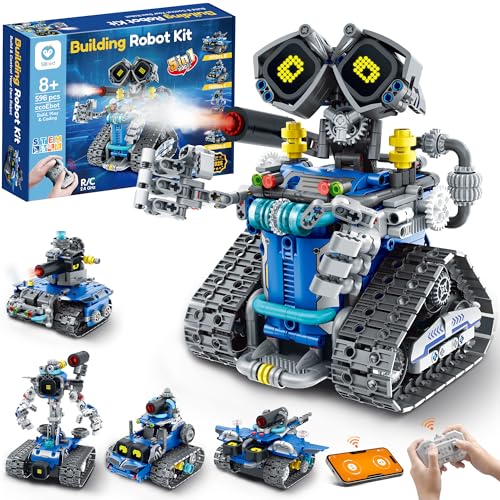
Sillbird STEM Robot Building Kit with Remote Control

Makeblock mBot Ranger 3 in 1 Robotics for Kids

STEM Robotics Kit Set Science Experiments Project Activities

Sillbird Robot Building Kit STEM Gifts for Boys 8-12

HOGOKIDS 5 in 1 Robot Building Toys for Kids

Wesfuner 30-in-1 Solar Robot Kit

Sillbird Solar Robot Building Kit 15-in-1 STEM Gift
More Details On Our Top Picks
Five buildable models give this kit a nice middle ground between toy and project. The LED eyes and sound effects add some personality, which helps in a family room where a robot needs more than looks to stay interesting.
The 473-piece count keeps it substantial without pushing into the more demanding territory of Makeblock mBot Ranger. You may find the app control more engaging than the remote alone, especially for kids who like steering something they built themselves.
What We Like
- Five model options keep rebuilds fresh.
- LED eyes make the finished robot feel lively.
- Remote and app control widen the play pattern.
- 473 pieces give you a solid hands-on build.
Areas To Watch
- App features can matter more than the remote for some households.
- The multi-model format asks for a bit more patience during rebuilds.
- Small parts mean setup and storage need a tidy surface.
Feature Rundown
Who It Suits Best
You get the most from this kit in a home that wants one build to lead into several play sessions. It fits kids who like motion, lights, and a little coding flavor without jumping straight into a heavier engineering set.
Where A Sibling Pick Shines
Sillbird STEM Robot Building Kit with Remote Control is a better match for you if you want more pieces and a roomier build than the 473-piece version.
This Sillbird kit looks like the roomier sibling to the first pick, with 596 pieces and the same 5-in-1 idea. That extra piece count matters most on a rainy afternoon or any weekend where you want the build itself to take center stage.
The trade-off is simple, more pieces usually means more table space and more time at the instructions. For older kids who like a longer build and a little more complexity, that’s often exactly the point.
Positives
- 596 pieces create a fuller build experience.
- Five model options stretch the kit’s replay value.
- App control adds a modern control path.
- LED eyes help the finished robot feel animated.
Small Caveats
- More parts can slow the first assembly session.
- The larger build asks for a clear work area.
Core Details
Built With In Mind
You get the best match here for an older child who likes a longer assembly session and doesn’t mind sorting a larger set of pieces. It also works well in homes where the finished robot will be used as much as the building process.
Where A Sibling Pick Shines
Sillbird Robot Building Kit with Remote Control suits you better when you want a slightly lighter build that still keeps the same style of play.
Makeblock takes a more technical path than the Sillbird kits, and that shows in the 3-in-1 format plus the Scratch learning angle. Kids who already like coding toys usually get more out of a set that asks them to think about programming, not just assembly.
The three shapes, Land Raider, Nervous Bird, and Dashing Raptor, keep the play pattern from feeling flat. In most homes, that mix works best for a child who wants to build, program, and then tinker again instead of treating the robot like a one-and-done project.
Highlights
- Three robot forms widen the learning path.
- Scratch support lowers the entry bar for coding.
- 16 projects give structure beyond the basic build.
- App control adds another layer of interaction.
Points To Note
- The learning curve sits above simpler build-and-play kits.
- Kids who only want fast assembly may prefer a lighter set.
- Programming-focused play works best with adult guidance at first.
Details At A Glance
Who Should Grab It
You get the most from this set in a home where coding skills matter as much as the finished robot. It suits kids who like step-by-step learning and don’t mind a more involved build.
A Better Fit Elsewhere
Sillbird Robot Building Kit with Remote Control is the easier first stop for younger builders who want a simpler path into robot play.
Tsomtto goes broad instead of deep, and that can suit households that want variety over a single large robot. The six build options, from a reptile robot to a bubble machine and a fiber lamp, make it feel more like a mini science station than a single toy box.
That spread helps for shared play, since not every child wants the same kind of project. The honest read is that this kit works best for shorter, repeatable sessions where the joy comes from building different things rather than mastering one elaborate robot.
Bright Spots
- Six separate builds add strong variety.
- Mixing robots and science-style projects keeps interest moving.
- Good fit for siblings who want different activities.
- The set encourages hands-on tinkering without feeling too narrow.
Room For Improvement
- The project mix may feel less focused than a single-feature robot kit.
- Families wanting coding depth may want a different pick.
- Small parts and multiple builds call for organized storage.
Quick Facts
Perfect Match For
You get the most value from this kit in a busy home that wants multiple project types without buying several separate sets. It also fits siblings who like taking turns with different builds.
Another Choice May Suit
Makeblock mBot Ranger 3 in 1 Robotics for Kids makes more sense for you if coding depth matters more than variety.
This one leans into play appeal with a red tracked racer layout, so it feels a bit more vehicle-like than the earlier Sillbird model kits. The 4-in-1 format and rechargeable design help it make sense in a home where you want fewer throwaway batteries and more repeated use.
For many families, that’s the sweet spot, enough build variety to keep things moving, without asking for the more technical approach of Makeblock. You may find it especially good for kids who like motion first and coding second.
Best Bits
- Tracked racer styling gives it strong visual appeal.
- Rechargeable design cuts down on battery swapping.
- 4-in-1 format keeps the build from feeling static.
- App control adds a second play mode.
Softer Spots
- The vehicle focus may matter more than robot shape for some kids.
- Four models give less variety than the five-model Sillbird kits.
- App-based play works best when the device setup is smooth.
Spec Overview
The Right Fit
You get the best fit here for a child who likes fast-looking builds, vehicle themes, and hands-on play that can repeat over time. It suits casual STEM use in a family room or play corner.
Where A Sibling Pick Shines
Sillbird STEM Robot Building Kit with Remote Control fits better if you want more piece count and a slightly broader model spread.
HOGOKIDS brings five model options and a control setup that works both by remote and app. The wall robot, engineer robot, mech dinosaur, tank, and stunt car give the set a playful range that suits kids who get bored when every rebuild looks too similar.
The 20-plus-meter control distance listed in the source gives it a larger play feel than many table-top kits. In a backyard or a roomy living area, that can matter more than extra decoration.
Reasons To Buy
- Five models bring good variety to repeated play.
- Remote and app control give you two ways to steer it.
- The long control distance helps in open spaces.
- Different model types keep the kit from feeling repetitive.
Worth Noting
- The feature mix can feel busy for very young builders.
- App setup matters more here than on simpler kits.
- Lots of parts call for careful sorting during assembly and storage.
Core Details
Whose Shelf It Belongs On
You get the most out of this kit in a home that wants active play and a few different robot personalities from one set. It suits kids who like moving toys more than display builds.
Look Elsewhere When
Makeblock mBot Ranger 3 in 1 Robotics for Kids fits better for a child who wants a stronger coding angle and a more structured learning path.
Wesfuner shifts the focus from remote control to solar learning, and that makes it a neat change of pace from the motion-first kits above. The 30-in-1 idea gives you a broad spread of builds, while the 243-piece count keeps the set manageable for a younger STEM session.
The source notes that the parts are ABS plastic, which usually helps with a sturdier feel in everyday use. The honest read is that this one suits families who want a science-project vibe more than a flashy robot race.
Positives
- Solar focus adds a clear science angle.
- 30 build options keep the kit varied.
- 243 pieces feel approachable for many school-age kids.
- ABS plastic construction suggests an everyday-friendly build feel.
Areas To Watch
- The learning style is more project-led than play-led.
- Solar kits usually depend on good light conditions.
- Multiple builds still need organized parts storage.
Technical Sheet
Made For
You get the best fit here for a child who likes science-project toys, solar themes, and a moderate build size. It also works well in a homeschool corner or after-school activity space.
Swap It Out When
Sillbird Solar Robot Building Kit 15-in-1 STEM Gift is a better match for you if you want a broader power choice and a family-friendly build style.
This Sillbird set stands out because it gives you two power paths, solar and battery, so the fun doesn’t depend on one setup alone. That flexibility matters in homes where a project might move from the kitchen table to a brighter windowsill.
The 15-in-1 format makes it the most flexible Sillbird option in this roundup, though that also means more deciding and rebuilding. For families who like a kit that can stretch across several afternoons, the mix feels nicely paced.
What We Like
- Solar and battery power give you more use options.
- 15-in-1 variety keeps rebuilds interesting.
- The DIY format suits shared parent-child projects.
- It works for school-style activities and home play.
Trade Offs
- More model choices can slow the first pick.
- Solar play still depends on light conditions.
- Battery use adds another part of ownership to manage.
Feature Snapshot
Who Will Love This
You get the most from this kit if you want one project that can adapt to different spaces and play moods. It suits families, homeschool setups, and children who like changing a build after the first round.
Skip It When
Wesfuner 30-in-1 Solar Robot Kit makes more sense if you want a more solar-centered science feel and a larger model count.
How To Choose The Right Build A Robot Kits
Match the kit to the child’s patience level
A good robot kit starts with the build experience, not the control gimmick. Smaller kits with clear model paths suit younger kids, while larger sets with multiple rebuilds fit children who like sorting parts and following steps over a longer stretch.
Decide whether play or coding matters more
Some kits lean toward motion and remote control, while others add Scratch learning or app-based programming. Scratch is a block-based coding system, and it lowers the barrier for beginners who are not ready for typed code.
Check the rebuild count, not just the box count
A 5-in-1 or 15-in-1 label usually means more long-term variety, but it can also mean more time spent swapping parts. That trade-off is worth it for families who want a kit to last across several sessions instead of one afternoon.
Pay attention to the power setup and space
Solar kits make the most sense near bright windows or in homes that like science-project style play. Remote and app-controlled kits suit floor space better, especially in rooms where a robot can move more than a few feet without bumping into furniture.
A Quick Reality Check
Common Shopping Slip Ups
Shoppers often focus on robot count and forget the actual build complexity. A kit with many models can still feel tough for younger kids, so piece count, control style, and assembly time deserve equal attention.
The Upgrade Payoff
Higher-tier kits usually spend the extra money on more parts, more model options, or stronger coding features. That upgrade makes sense for older kids, classroom-style projects, or any home where the same kit needs to hold interest for more than a few days.
Frequently Asked Questions
What age range works best for these kits?
Most of these sets fit school-age kids, with several aimed at ages 8 to 12 or 8 to 14. Younger children usually do better with the simpler, more guided kits.
Are robot kits better than simple building sets?
Robot kits give you more moving parts, control options, and learning value. Simple building sets are easier to start, but they usually do less after the build.
Do solar robot kits need direct sunlight?
They work best in bright light, so a sunny windowsill helps. Battery support, when included, gives you a more flexible fallback.
Is app control useful for kids?
App control can make the build feel more interactive and give older kids a stronger sense of control. It matters less for very young children who mainly want the robot to move.
Which kit is easiest to grow with?
Sillbird Solar Robot Building Kit 15-in-1 and Sillbird STEM Robot Building Kit with Remote Control both leave room for repeat play. Makeblock mBot Ranger is the deeper choice for kids who get serious about coding.
Closing Thoughts
You get the best result from Build A Robot Kits when the set matches the child’s attention span, not just the age on the label. The simpler Sillbird options work well for motion and rebuilding, Makeblock leans into coding, and the solar kits bring a calmer science-project feel. That mix gives you a real range, from quick build-and-play sessions to longer hands-on learning. Choose the one that fits the way your home actually plays, and the kit is far more likely to stay in rotation.