Educational robots can make screen time feel more active, whether you want a toy that talks back, a coding kit that teaches logic, or a desk companion that keeps older kids curious. The right choice depends on age, patience, and how much hands-on setup you want to manage. Some picks here are playful enough for a birthday gift, while others fit classrooms, family game nights, or a work desk that needs a little personality.
The Shortlist At A Glance
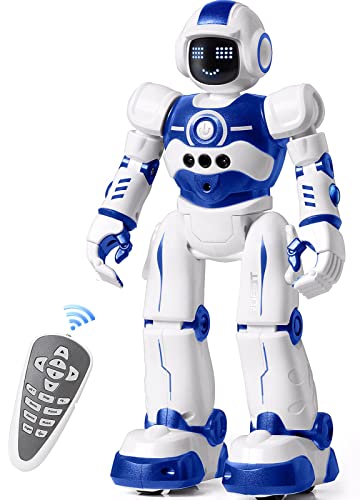
EduCuties Robot Toy for Kids, Programmable Remote Control Smart Walking Dancing Robot

eeBoo Build a Robot Spinner Game, Matching Game, Ages 3+

RIVGOT Drawing Robot for Kids with 150 Cards

Ozobot Evo Coding Robot Kit

Contixo R1 Kids Robot Toy, Blue Interactive Smart Robot

Contixo R1 Kids Robot Toy, Mini Electronic Robot

Contixo R1 Kids Robot Toy, Pink Interactive Smart Robot

LOOI Robot-Space Black AI Desktop Companion
More Details On Our Top Picks
EduCuties keeps this pick focused on motion and play, so it suits a child who wants a robot that walks, dances, and responds without feeling too technical. The remote control and app control give you two ways to steer the fun, which helps in a living room where younger kids may prefer simple buttons while older ones want more control.
The trade-off is that this style of robot leans playful more than instructional, so it works better as an intro to cause and effect than as a deeper STEM lesson. Compared with the Ozobot Evo kit, it asks far less from you at setup, and that makes it a friendlier birthday gift for a mixed-age household.
Strong Points
- Remote control and app control broaden how your child can play.
- Walking and dancing actions keep younger kids engaged without a long learning curve.
- Gesture and sensing support adds a more interactive feel than a basic remote toy.
- Works well for casual indoor play in a family room or playroom.
Points To Note
- The focus stays on entertainment, so the learning side is lighter than a coding kit.
- App-based play can feel like extra setup for families that prefer a no-frills toy.
- Moving parts usually need routine clearing of dust and floor clutter.
Feature Snapshot
Who It Suits Best
You get the most from this pick if you want a playful robot for a younger child who likes movement, sound, and simple interaction.
Where Another Pick Suits Better
Ozobot Evo Coding Robot Kit fits better for kids who are ready for more structured STEM tasks and classroom-style learning.
This one is less about a moving robot and more about building the idea of a robot through a matching game, which makes it a nice fit for table play with a preschooler. The spinner, robot pieces, and 2 to 4 player format keep the pace light, so family game night feels easy instead of competitive.
The honest read is that the educational lift stays gentle, with early number recognition built into the play rather than delivered like a lesson. Compared with the EduCuties robot, this pick swaps batteries and buttons for conversation, matching, and turn taking, which suits quieter homes.
Highlights
- Works well for 2 to 4 players, so it suits siblings or a small group.
- The spinner format keeps play simple for younger children.
- Number recognition slips into the game naturally.
- Robot-building pieces support imaginative play without a screen.
Small Caveats
- It plays more like a tabletop game than a mechanical robot.
- Children who want motion or sound may move on quickly.
Details At A Glance
The Right Fit
You should lean toward this game if you want a low-pressure way to introduce robots, numbers, and turn taking to a preschooler.
Skip It When
RIVGOT Drawing Robot for Kids with 150 Cards suits children who want a more hands-on, guided art activity instead of a matching game.
RIVGOT leans into guided drawing, so you get a toy that feels closer to an art coach than a moving robot. The included 150 cards give the child a clear next step, which matters in a busy kitchen table session where open-ended toys can lose momentum fast.
Built-in music adds some energy, though the bigger draw is the step-by-step structure that helps a child stay with the activity. Unlike eeBoo Build a Robot Spinner Game, this one hands over a more individual, quiet project, and that suits kids who like to sit, trace, and repeat.
Bright Spots
- 150 cards provide a lot of drawing prompts.
- Step-by-step use can help a child stay focused longer.
- Music makes the activity feel less like a worksheet.
- Good fit for independent art time at home.
Areas To Watch
- The card-based format needs a little organization so pieces stay together.
- Kids who want freeform drawing may outgrow the guided structure.
Core Details
Whose Shelf It Belongs On
This is a strong fit for a child who likes art projects with clear instructions and a little musical feedback.
Another Choice May Suit
Contixo R1 Kids Robot Toy, Blue Interactive Smart Robot suits kids who want more movement and voice play than a drawing-focused activity.
Ozobot Evo is the most classroom-minded pick in this group, and that shows in how naturally it fits coding lessons for ages 5 to 11. The smaller size and teacher-friendly framing make it a smart fit for a home school table or a structured after-school setup, especially once a child is ready for more than toy-level interaction.
The trade-off is straightforward, since this is less casual than the Contixo toys and less immediately playful than the EduCuties robot. You get a stronger learning angle, but you also ask for more attention and a bit more patience from the child using it.
Reasons To Buy
- Built for coding-focused learning rather than simple play loops.
- Fits a wide age band from early elementary into preteen years.
- Works naturally in classroom or home school settings.
- Encourages logical thinking through guided STEM use.
- More structured than toy robots that mainly dance or talk.
Worth Noting
- The learning curve is higher than the toy-style picks above it.
- Some homes will want a parent nearby for the first few sessions.
Spec Overview
Built With In Mind
You get the most from this kit in a home school, STEM club, or classroom where coding is part of the day.
A Better Fit Elsewhere
eeBoo Build a Robot Spinner Game suits younger children who need a lighter introduction to robot-themed play before moving into coding.
The blue Contixo R1 sits in a sweet spot for households that want a compact robot with voice control, touch response, and simple movement. It sings, dances, repeats, and walks, so it feels lively without asking you to manage a complicated setup, which matters for a quick after-dinner play session.
At 3.9 x 3.7 x 5.1 inches, the size stays friendly for shelves, backpacks, and small toy bins. Compared with the Ozobot Evo kit, this one asks less from you and gives more instant fun, though the learning side is lighter and the batteries are not included.
Best Bits
- Voice control and touch sensing make interaction feel natural for young kids.
- Compact dimensions help it fit in small spaces.
- Voice recording lets you add a personal touch to play.
- Durable plastic body is easier to wipe down after daily use.
Room For Improvement
- AAA batteries are needed, so you’ll want to keep spares nearby.
- It stays more playful than educational in the deeper STEM sense.
- Toy parts that move and speak usually need a bit of cleaning upkeep.
Feature Rundown
Who Should Grab It
This is a solid fit for younger children who want a compact robot that feels lively without taking over the whole room.
Look Elsewhere When
Ozobot Evo Coding Robot Kit fits better for families who want a stronger STEM angle and a more lesson-like experience.
This version of the Contixo R1 trims the footprint down and leans into lights, music, dancing, and touch response. For a nursery shelf, a travel bag, or a cramped play area, that smaller shape can matter more than a long list of features.
The control setup stays simple, and the recording feature gives kids a familiar way to replay voices and keep the toy feeling personal. Compared with the blue version above, the core appeal is almost the same, but this one stands out more for portability than for presence.
Upsides
- Mini size makes storage and travel easier.
- Lights and music keep it lively for short play bursts.
- Touch sensor interaction stays simple for little hands.
- Recording feature adds a personal angle to play.
Minor Gripes
- The smaller body can feel less substantial than larger robot toys.
- Battery-powered toys are easiest to manage with a spare set ready.
Quick Facts
Perfect Match For
You get the best fit here if you want a small robot toy that can move from room to room with very little fuss.
Swap It Out When
RIVGOT Drawing Robot for Kids with 150 Cards is the better call for a child who prefers seated, guided creative play.
The pink Contixo R1 keeps the same playful formula as the blue version, but the color gives it a friendlier gift feel right out of the box. Voice control, talking, dancing, and touch sensing make it easy for kids to interact with, and the toy still stays compact enough for everyday storage.
It’s a familiar choice rather than a radically different one, which is useful for families that already know they want the Contixo style and just prefer this finish. For a child who likes color-specific toys, the look alone can make this the easier yes, though the learning depth remains light.
Positives
- Voice control adds a fun hands-free interaction layer.
- Touch sensing makes simple commands feel immediate.
- Compact size works well in shared bedrooms and play bins.
- Pink finish gives it a distinct gift-ready appearance.
Things To Consider
- The educational content is basic compared with coding-focused kits.
- Like other small robot toys, routine battery planning helps keep play smooth.
At A Glance
Made For
This suits a child who wants a colorful robot toy with simple interaction and low setup demands.
Where A Sibling Pick Shines
Contixo R1 Kids Robot Toy, Blue Interactive Smart Robot is the better match for families who prefer the blue finish or are comparing similar compact toys.
LOOI moves the category in a different direction, because this is less a child’s toy and more a voice-driven desktop companion with memory, face tracking, and everyday helper features. It speaks only English, so that matters straight away, but the bigger point is that it aims for ongoing interaction instead of short bursts of play.
That’s a different lane from the kid-focused Contixo and EduCuties picks, and the difference shows up in the way it fits beside a laptop or monitor. For a desk setup, it can feel like a small companion rather than a gadget, though the higher complexity will not suit every home.
What We Like
- Voice interaction makes it feel more conversational than toy-like.
- Long-term and short-term memory support a more personal experience.
- Face tracking, reminders, weather, games, and clock functions add practical use.
- 10W wireless charging adds desk convenience for supported setups.
Honest Caveats
- The English-only support limits flexibility in multilingual homes.
- Wireless charging needs a 9V/2A+ adapter, so setup details matter.
- It makes the most sense on a desk, not in a toy bin.
Feature Card
Who Will Love This
This fits an older teen or adult who wants a conversational desk companion with practical extras, not a kid’s robot toy.
Reach For A Different Pick When
Ozobot Evo Coding Robot Kit is the better match for a child or classroom setup that needs a more direct STEM learning path.
How To Choose The Right Educational Robots
Start With Age And Attention Span
Age range matters, but attention span matters just as much. A preschooler often does better with a robot toy that reacts quickly, like the Contixo R1 or the EduCuties model, while an older child may be ready for Ozobot Evo’s more structured coding approach.
That split matters because frustration usually appears when the toy asks for more patience than the child has that day. A guided drawing robot or a tabletop game can work beautifully for short sessions, while a coding kit rewards longer focus and repeated use.
Choose The Learning Style You Want
Educational robots fall into a few clear lanes: movement toys, drawing assistants, matching games, and coding tools. The lane you choose shapes the whole experience, so a family that wants playful interaction should lean toward voice control or motion, while a home school setup usually benefits from step-by-step logic.
Think about what kind of learning feels natural in your space. A robot that walks and dances brings instant engagement, but a robot that teaches sequencing or drawing carries more skill-building weight over time.
Match Features To The Room You’ll Use
Size and power style affect daily use more than many shoppers expect. Compact toys like the mini Contixo version store easily, while a desktop companion like LOOI needs a stable spot and a charging plan that makes sense beside your computer.
Maintenance matters too. Plastic bodies are easier to wipe down, battery-powered toys need spare batteries nearby, and card-based games need a tidy storage routine so pieces do not drift apart.
Things Worth Knowing First
Common Shopping Slip Ups
The most common mistake is treating every educational robot like a coding tool. Some are mainly toys, some are art helpers, and some are desk companions, so the learning value changes a lot from model to model.
Another easy miss is ignoring setup and storage. A battery-powered robot, a card game, and a voice-driven desktop companion each ask for a different amount of space and care.
The Upgrade Payoff
Higher-tier models usually cost more because they do more than move or talk. Memory features, voice interaction, face tracking, or classroom-oriented coding support add parts, software, and design complexity.
That extra spend makes sense for older kids, classrooms, or desk setups where the device will get regular use. For occasional play, a simpler robot often gives you enough without making the experience feel heavy.
Frequently Asked Questions
What Age Works Best For Educational Robots?
Many educational robots start around age 3, but the best fit depends on how much guidance the child needs. Younger children usually prefer simple motion or matching, while older kids often enjoy coding and step-by-step tasks.
Are Coding Robots Better Than Toy Robots?
Coding robots usually teach more structured skills, so they suit children who enjoy logic and patterns. Toy robots can still be worthwhile because they build curiosity, sequencing, and cause-and-effect thinking through play.
Do Educational Robots Need A Lot Of Setup?
Some do, especially coding kits and voice-driven companions. Simple toy robots and board-game style picks are easier to bring into play right away.
Which Option Works Best For Shared Spaces?
Compact robots and tabletop games are the easiest to manage in a family room or bedroom. Larger interactive models can feel crowded unless you have a dedicated shelf or desk.
What Should You Prioritize First?
Start with the age range, then think about whether you want play, art, coding, or conversation. That order usually leads you to the right kind of robot faster than chasing extra features.
Final Thoughts
The best educational robot for your home depends on how you want learning to feel. EduCuties and the Contixo models lean playful, eeBoo keeps things social, RIVGOT supports quiet creativity, and Ozobot Evo brings the clearest STEM path. LOOI sits in a different lane altogether, with a more grown-up desk companion feel. Match the robot to the room, the child, and the amount of structure you want, and you’ll land on a choice that actually gets used.