Battle robot kits give you something better than a screen distraction, they turn curiosity into a build you can steer, program, and challenge. For kids, teens, and adults who like STEM projects, the right kit depends on whether you want coding practice, remote control play, or a more advanced mechanical build. Some sets lean playful, others feel closer to a classroom lab, and that difference matters once the parts are on the table.
Quick Look At Our Shortlist

Makeblock mBot Ranger 3 in 1 Robotics for Kids Age 8-12
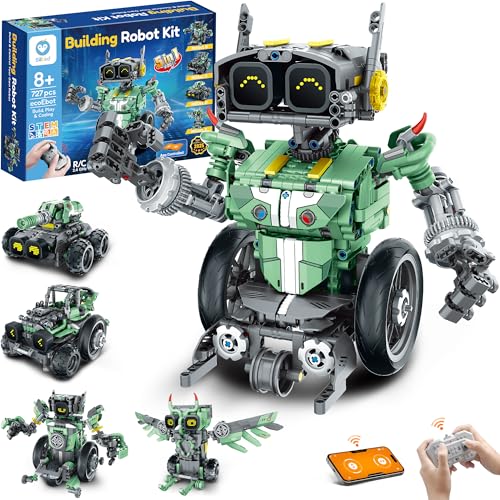
Sillbird Robot Car Building Kit with Remote Control Gift

HEXBUG BattleBots Arena MAX, Remote Control Robot Toys

Thames & Kosmos Robotics Smart Machines

Thames & Kosmos Hydraulic Boxing Bots STEM Experiment Kit
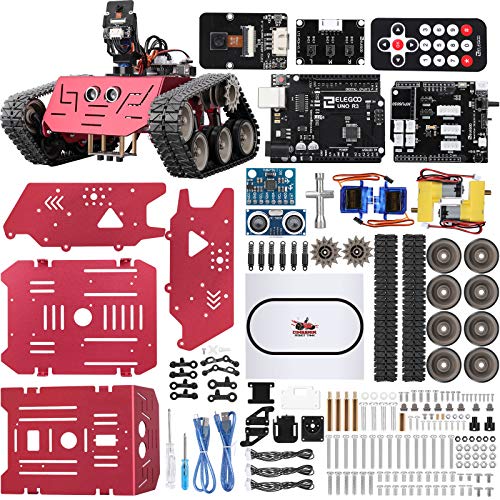
ELEGOO Conqueror Robot Tank Kit with UNO R3

LewanSoul Robotic Arm Kit 6DOF Programming Robot Arm

ELEGOO Tumbller Self-Balancing Robot Kit for Arduino
More Details On Our Top Picks
The mBot Ranger stands out because it gives you three robot forms in one box, including a tank, a balancing bot, and a three-wheel racer. That range makes it a strong fit for homes where one project needs to last longer than a weekend, especially once the coding side starts pulling more weight than the play value alone.
You also get a clear bridge into coding and hands-on STEM work through the Makeblock app, Arduino-based learning, and Scratch-style programming. The trade-off is that this feels more advanced than a toy-first kit, so younger kids may need steady help from a parent or older sibling.
What We Like
- Three robot configurations keep the project from feeling repetitive.
- Makeblock app control adds a practical layer of interaction.
- Arduino and Scratch learning support coding growth in a familiar path.
- The build suits long-form tinkering, not just quick assembly.
Points To Note
- The more advanced setup can slow down first-time builders.
- Piece management matters, since multi-mode kits tend to sprawl on the table.
- Play value leans educational, so it is less grab-and-go than a simple remote car.
Feature Rundown
Who It Suits Best
Advanced beginners and STEM-focused families get the most from this one, especially in a home where coding practice matters as much as robot play.
Where A Sibling Pick Shines
Thames & Kosmos Robotics Smart Machines suits younger builders better, since its guided manual and multiple builds feel more structured than Makeblock mBot Ranger 3 in 1 Robotics for Kids Age 8-12.
After the more advanced Makeblock kit, this Sillbird set looks friendlier for a birthday build or a weekend project with visible results. The 727-piece count points to a longer assembly session, and the 5-in-1 layout gives you more than one way to keep the finished model around.
Rechargeable play is a useful touch for families tired of hunting through drawers for batteries, though the source details focus more on the build experience than on raw speed or rough-terrain use. You may find it most satisfying when you want a gift that feels thoughtful without becoming intimidating.
Reasons To Buy
- Five model paths add variety once the first build is done.
- 727 pieces create a substantial project with real assembly time.
- Rechargeable power reduces daily battery swapping.
- The gift-friendly design suits birthdays and milestone rewards.
Small Caveats
- The larger parts count asks for a clear workspace and patience.
- It leans more toward creative building than battle-style play.
- Instruction flow can matter a lot in a kit this size, so younger builders may need help.
Feature Card
Made For
Gift givers and kids who like a longer build session will get the cleanest fit here, especially in a family setting where shared assembly matters.
Another Choice May Suit
HEXBUG BattleBots Arena MAX suits kids who want immediate matchup play instead of a larger multi-build project like Sillbird Robot Car Building Kit with Remote Control Gift.
HEXBUG takes a different route from the build-heavy kits above, because it gives you a battle arena and a customizable tank-style bot rather than a coding-first lesson. The included Tombstone tie-in and the wall-enclosed arena make it feel ready for head-to-head play right out of the box.
Two controllers and batteries are included, which makes the start-up process easier for families who want action without extra trips for power cells. The honest read is that this one leans more toward competitive fun than deep engineering, so the educational side stays lighter than on Makeblock or ELEGOO.
Standout Traits
- The arena layout helps keep matches contained and easy to follow.
- More than 30 pieces give you enough parts to personalize the bot.
- Two remotes make shared play more practical.
- Batteries included simplifies the first setup.
Areas To Watch
- It is less about programming and more about play action.
- A battle arena takes up more space than a basic tabletop bot.
- Track and accessory pieces can need careful storage after play.
Core Details
Who Should Grab It
Families who want a battle-themed toy with immediate action will get the best fit here, especially for shared play sessions.
Look Elsewhere When
Thames & Kosmos Robotics Smart Machines makes more sense for structured STEM learning than HEXBUG BattleBots Arena MAX, Remote Control Robot Toys.
This Thames & Kosmos kit feels like the classroom-friendly option in the lineup, with a full-color manual and eight robot builds to keep the project moving. Because it asks for a tablet or smartphone, it suits homes that are comfortable mixing printed instructions with a little screen-guided setup.
The bigger appeal is repetition with purpose, since each build teaches a different machine concept without forcing you into a single final model. Compared with HEXBUG’s arena play, this one leans harder into methodical learning and gives you a slower, more deliberate pace.
Bright Spots
- Eight robot builds stretch the learning value well past a single afternoon.
- The full-color manual helps the assembly process feel clearer.
- Tablet or smartphone support fits a modern home setup.
- Its structure works well for parents guiding younger builders.
Room For Improvement
- The need for a tablet or smartphone adds a device dependency.
- It favors guided learning over open-ended battle play.
- Multiple builds mean more small parts to sort and store.
Technical Sheet
Right Fit For
Kids who like guided science projects and parents who want a steadier learning curve will get the cleanest match here.
A Better Fit Elsewhere
Makeblock mBot Ranger 3 in 1 Robotics for Kids Age 8-12 suits families who want a stronger coding angle than Thames & Kosmos Robotics Smart Machines.
Hydraulics give this kit a different personality from the coding-heavy picks, because you’re building two boxing robots that move with water-powered force rather than code logic. That makes it a smart fit for kids who like seeing cause and effect in a very direct way, almost like a tiny mechanics lesson with gloves on.
The gears, cylinders, and pistons give you a clearer look at how motion can be transferred through fluid pressure. One thing worth considering is the maintenance side, since water-based mechanisms need a bit more care during setup and cleanup than dry, battery-driven bots.
Upsides
- Two robot builds create a ready-made head-to-head format.
- Hydraulic motion makes the mechanical concept easy to see.
- Gears, cylinders, and pistons give the project real STEM depth.
- The duel format keeps younger builders engaged after assembly.
Softer Spots
- The water-powered system asks for careful assembly and cleanup.
- It is more about mechanics than software or coding.
- Storage can be a little less tidy than with a dry robot kit.
Details At A Glance
The Right Fit
Curious kids who like visible mechanics and a hands-on science angle will get the most out of this set.
Swap It Out When
Sillbird Robot Car Building Kit with Remote Control Gift suits you better if you want a larger multi-model build with rechargeable play rather than hydraulic learning.
ELEGOO gives you a tank-style robot with UNO R3 support, which points straight at Arduino learning and more technical tinkering. Compared with the softer, more guided Thames & Kosmos kits, this one feels better suited to teens or older kids who want a project that looks and feels closer to real robotics.
The tank format usually appeals to anyone who likes a stable chassis and a serious-looking platform for coding practice. The trade-off is simple, the learning curve will likely feel steeper than a remote-control toy, so it works best in a setting where patience is part of the plan.
Positives
- UNO R3 support opens the door to Arduino-style learning.
- The tank layout gives the kit a sturdy, grounded feel.
- It suits older kids who want more technical depth.
- The build style encourages longer-term tinkering and code practice.
Honest Caveats
- The learning curve is less forgiving than simpler robot toys.
- It is not the fastest route to instant play.
- Beginners may need more adult support during setup.
Spec Overview
Best Suited To
Teens, older beginners, and STEM hobbyists who want a real coding path rather than quick novelty will feel at home here.
Another Choice May Suit
Makeblock mBot Ranger 3 in 1 Robotics for Kids Age 8-12 is friendlier for younger builders who want multiple forms without jumping into the same level of technical depth.
This LewanSoul arm moves the category away from tanks and duel bots and into desktop robotics, which is a meaningful shift for anyone interested in grasping, lifting, and positioning objects. The 6DOF design means six degrees of freedom, so the arm can move with a much more flexible range than a simple clamp or toy claw.
Its five servo motors and mechanical claw make it a stronger fit for programming demos and tabletop projects than for rough play. The anti-stall protection is a welcome practical detail, because servo strain can become a headache in robotic arms that get used often.
What We Like
- 6DOF movement gives the arm a broad range of motion.
- The mechanical claw works well for grasping and transport demos.
- PC software and app control support varied learning paths.
- Anti-stall protection helps support longer servo life.
Minor Gripes
- Desktop use makes it less suited to active battle-style play.
- Programming interest matters more here than casual toy appeal.
- PC-based setup may feel less relaxed than app-only kits.
Feature Snapshot
Whose Shelf It Belongs On
Older kids, teens, and hobbyists who want a desktop arm for coding practice and object handling will get the best match here.
Reach For A Different Pick When
ELEGOO Conqueror Robot Tank Kit with UNO R3 suits you better if you want a wheeled Arduino platform instead of a stationary arm.
The Tumbller keeps things tight and focused with a self-balancing design, so it makes sense for desks, small work areas, or a shelf that doubles as a project zone. Balance-based robots tend to be satisfying because the movement feels precise, and this one should appeal to kids who like seeing stability become part of the lesson.
It also fits neatly beside ELEGOO’s Conqueror tank, but the feel is very different, since this model centers on balance rather than terrain control. You may find it better for compact spaces and solo tinkering than for noisy group play.
Best Bits
- Self-balancing design adds a clear robotics lesson.
- The compact layout suits smaller desks and work areas.
- Arduino focus keeps it aligned with STEM learning.
- It gives you a more technical build without a large footprint.
Trade Offs
- The small format may feel modest next to larger battle kits.
- Balance-focused play can be less flashy than arena-based fun.
- It is more about learning motion control than combat-style action.
Core Details
The Right Fit
Space-conscious builders and STEM learners who want a compact technical project will get the best fit here.
Skip It When
HEXBUG BattleBots Arena MAX is the stronger match for families who want active robot battles instead of a balance-centered build.
How To Choose The Right Battle Robot Kits
Match The Build To The Skill Level
Start with the builder’s patience, not the box art. A multi-mode kit like Makeblock mBot Ranger asks for more focus than a play-first set like HEXBUG BattleBots Arena MAX, while Thames & Kosmos Robotics Smart Machines sits in the middle with guided steps and a clear manual.
Age labels help, but they don’t tell the whole story. A child who enjoys sorting parts and following diagrams can handle a more detailed kit, while a beginner who wants quick action will usually do better with a remote-control model.
Choose Your Main Goal First
Battle robot kits split into a few clear lanes: coding, remote play, mechanism learning, and compact robotics. ELEGOO Conqueror and Makeblock mBot Ranger lean toward coding, while HEXBUG and Sillbird focus more on building and play.
That first choice matters because it shapes everything else, from assembly time to storage needs. A robotics arm like LewanSoul gives you object handling and programming practice, but it won’t scratch the same battle itch as a tank or arena set.
Think About Space And Cleanup
Large kits spread out fast, and that matters in real homes. A multi-build set with 700-plus pieces needs a tray, a table, or a clear floor area, while a compact model like ELEGOO Tumbller stays easier to manage on a desk.
Water-powered kits and multi-part arena sets also ask for more cleanup than a simple robot car. That’s not a flaw, just part of the ownership trade-off that comes with more moving pieces and a deeper build.
Look At The Learning Path
Some kits teach robotics through motion, others through software. Scratch support, Arduino boards, servos, and hydraulic systems all point to different kinds of learning, so the right choice depends on whether the goal is code, mechanics, or a mix of both.
Families planning repeat projects usually get more value from kits that let you rebuild or reprogram. For a one-time gift with instant play, a simpler remote setup often feels smoother.
Things Worth Knowing First
Mistakes Worth Dodging
One common miss is buying a kit that looks exciting but asks for more support than the home can give. A complex Arduino set can stall if the builder wants quick results, while a toy-first bot may feel too light for a teen who wants real coding practice.
Another slip is ignoring the parts count and space needs. A larger build can be a joy, but only when you have a place to sort pieces and keep track of tiny connectors.
The Upgrade Payoff
Higher-tier kits usually cost more because they include richer control systems, better materials, and more than one learning layer. App control, full-color manuals, extra servos, and multiple build modes all add design work and assembly complexity.
That upgrade makes sense when you want a kit that stays interesting after the first weekend. For casual play, the added depth can be more than you need, but for steady STEM use, the extra structure often earns its place.
Frequently Asked Questions
Are battle robot kits hard to build?
Some are simple enough for younger kids with help, while others feel more like beginner engineering projects. The build difficulty usually rises with coding support, part count, and the number of moving mechanisms.
Which kit works best for coding practice?
Makeblock mBot Ranger 3 in 1 Robotics for Kids Age 8-12 and ELEGOO Conqueror Robot Tank Kit with UNO R3 both lean into coding more directly. The better fit depends on whether you want a multi-mode build or a tank-style Arduino platform.
What kind of space do these kits need?
Remote-control arenas and larger multi-piece kits need a real table or floor area. Compact builds like ELEGOO Tumbller stay easier to manage in smaller rooms or on a desktop.
Do any of these kits focus more on play than learning?
HEXBUG BattleBots Arena MAX is the clearest play-first option in this list. It still has STEM value, but the main draw is fast, matchup-style fun.
Which option is better for older kids or teens?
ELEGOO Conqueror Robot Tank Kit with UNO R3 and LewanSoul Robotic Arm Kit 6DOF Programming Robot Arm both suit older builders well. They ask for more patience and reward deeper technical interest.
Final Thoughts
You have a lot of good directions here, and the right choice depends on what kind of hands-on experience you want to encourage. For coding growth, Makeblock and ELEGOO lead the way, while HEXBUG brings the most immediate battle energy. If you want something calmer and more structured, Thames & Kosmos has the clearest learning path. Pick the kit that matches the builder’s patience, space, and curiosity, and the project will feel useful long after the box is open.